Want to perfectly transfer both iPhone SMS and MMS messages to Android phone? Backuptrans iPhone SMS + MMS to Android Transfer must be the best choice for you. It will do it by only one single click. Fully compatible with the latest iOS 9 and iPhone 6S/iPhone 6S Plus.
 Go to Mac Version
 Overview
The best way to transfer SMS and MMS from iPhone to Android. No Jailbreak/Root required.
If you have an iPhone and plan to get an Android phone, chances are that you want to keep those old iPhone messages on your android phone as well. Now this iPhone SMS + MMS to Android Transfer can do this for you perfectly.
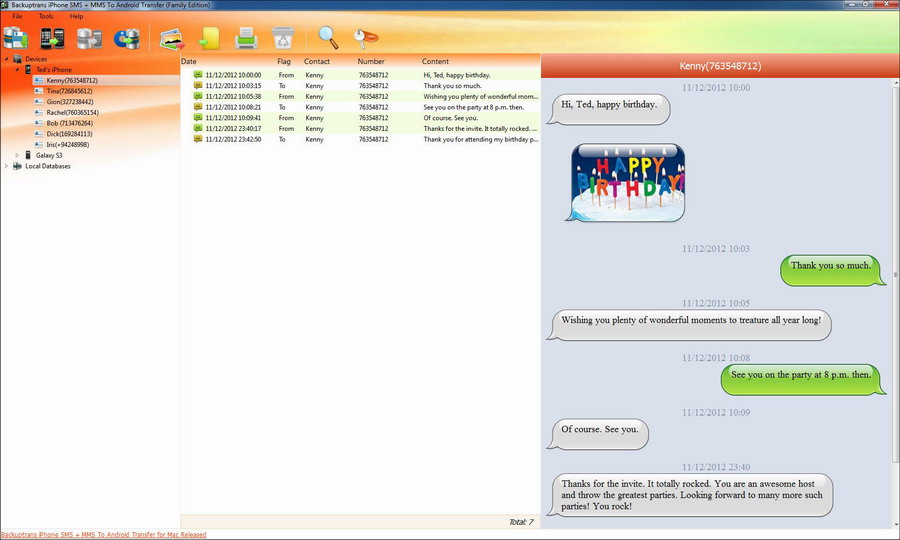
Backuptrans iPhone SMS + MMS to Android Transfer is designed to transfer iPhone SMS/MMS to Android phone directly. Connect both your iPhone and android phone to computer, and you will get it done in a few seconds. Users can choose to either transfer all iPhone SMS and MMS to Android phone or just transfer the SMS and MMS with a certain friend as you want. Besides, you can also choose to transfer messages into Android from iTunes backup if you once backed up your iPhone data with your iTunes library. If yes, you can use our software to put all messages from iTunes backup onto your Android phone smoothly even without your old iPhone. Viewing, exporting or printing out your iPhone SMS and MMS on your computer are supported, too. Users can export and save iPhone SMS and MMS as a document file onto computer with a few clicks even though it came across a broken iPhone screen. File format includes txt, csv, word, pdf, html. Cleverly, Backuptrans iPhone SMS + MMS to Android Transfer let users print out iPhone messages in threading conversations. You are flexible to choose to export/print all iPhone messages or only the messages with a certain friend.
If you want to get iPhone MMS media files on your computer, now can be so easy. Simply click "Extract Media Files from MMS" button on the software, and it will automatically extract and copy pictures, videos, audios file from iPhone MMS messages onto computer. iMessages extracting is supported also.
The latest Updates:
Supports iOS 16 and iPhone 14/iPhone 14 Plus/iPhone 14 Pro/iPhone 14 Pro Max/iPhone SE 2022.
Supports Google Android 12.
Features
Transfer iPhone SMS and MMS to Android phone directly
iPhone SMS + MMS to Android Transfer makes it easier than ever to transfer SMS/MMS from iPhone to Android. Simply connect both iPhone and Android to your computer, our software will help you do the left. No jailbreak/Root required.
Tranfer SMS and MMS from iTunes backup to Android
What if a lost/broken iPhone but still want to keep the messages to your android phone? If you backup your iPhone data on your iTunes from time to time, this is good news. You can use iPhone SMS + MMS to Android Transfer to put messages from your iTunes backup to your android phone.
Save iPhone SMS and MMS to local database on computer
Easily save all your iPhone messages to local database on your computer. In this case, you can freely view, export or print out your SMS and MMS. It works well even with a screen-broken iPhone.
Copy SMS and MMS from local database to Android phone
After saving your iPhone SMS and MMS onto local database on your computer, you can easily copy the SMS and MMS onto android phone, either new or old. Moreover, you can decide whether to transfer all messages or only the messages with a certain contact.
Export iPhone SMS and MMS into document files
Want to read your iPhone SMS and MMS as document files? Now it's simple. iPhone SMS + MMS to Android Transfer allows you to export iPhone messages into txt, csv, word, pdf, html, either all messages or only the messages with a certain contact.
Extract media files, such as photos, videos, audios etc from iPhone MMS messages to computer
iPhone SMS + MMS to Android Transfer does a perfect job in extracting iPhone MMS media files to computer. Simply click one button on the software and it will automatically extract all pictures, videos, audios files etc from iPhone MMS messages onto computer.
Print out iPhone SMS and MMS in a few mouse clicks.
Perfectly print out your iPhone SMS and MMS in threading mode. Reading the printing output feels like the same as that on your iPhone. Again, you can also choose to print out all iPhone messages out or just print the messages with a certain contact.
iMessages management supported also
This software also enables you to backup, transfer, export and print iMessages.
Connect Android via WiFi
You can also connect your Android via WiFi to use our software besides via USB.
Smart Search and Filter
You can fast search messages by entering contact name, phone number, keywords or even part of the message.
Fast and safe
Transferring sms safely in fast speed; no worry about your computer slowing down or conflicting with other running programs.
User-friendly UI
Very easy to use, suitable for both beginners or advanced users.
Clean and reliable
100% clean. Easy and safe to install and uninstall.
Life-time free updates and fast customer support.
Screenshot
Requirements
Buy Now
Personal Edition
USD $24.95
(3 devices - Lifetime)
Personal Edition lets you manage SMS and MMS for up to 3 different devices for the price of one. Only download and install on your own personal windows computer.
Family Edition
USD $34.95
(8 devices - Lifetime)
Family Edition lets you download and install on all windows computers of your family and manage SMS & MMS for up to 8 different devices in your family for the price of one.