With Backuptrans Android SMS + MMS Transfer, it's now easier than ever to transfer Android SMS and MMS to computer or transfer SMS & MMS from old Android to new Android. The best fast & easy-to-use choice that lets you do both with only one software.
 Go to Mac Version
 Overview
Transfer Android SMS & MMS to computer, transfer SMS and MMS from one Android to another Android
Backuptrans Android SMS + MMS Transfer is a professional Android messages Transfer software used and trusted by worldwide Android phone users. It makes it easier than ever to transfer Android SMS/MMS between Android phone and computer as well as between two Android phones. Printing supported.
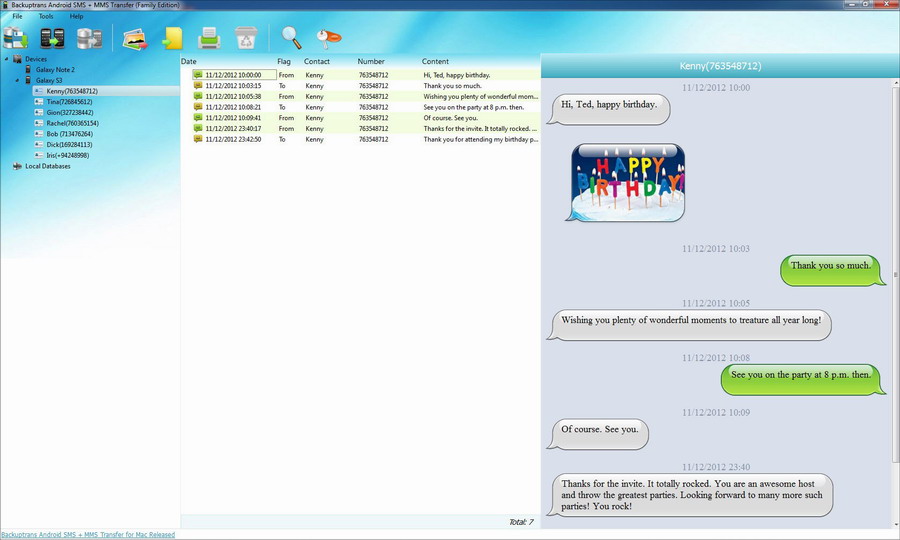
Transfer your important Android SMS and MMS onto computer from time to time, and you won't need to worry about any unforeseen messages loss, such as a lost phone. Meanwhile, you can also freely view, export or print out your SMS/MMS messages on your computer by the use of Backuptrans Android SMS + MMS Transfer. You can copy and transfer messages from the Android phone even with a broken phone screen. If you want to export SMS into files such as txt, csv, word, pdf or html, Android SMS + MMS Transfer must be the right choice. Plus, it lets users quickly print out SMS/MMS memssages in threading mode. You are flexible to choose to export or print all SMS/MMS or only the SMS/MMS with a certain friend.
What if Android to Android SMS and MMS transferring? Simple enough, too. After you plug in two android devices to the computer, you can transfer SMS and MMS from one Android to another by clicking a simple menu. Read your old SMS and MMS on the new android phone on the go.
If you want to extract and put MMS media files on your computer, now can be so easy. Simply click "Extract Media Files from MMS" button on the software, and it will automatically extract pictures, videos, audios file from Android MMS messages onto computer.
No matter you are a beginner or an advanced user, you will find no trouble in using Backuptrans Android SMS + MMS Transfer to transfer Android SMS/MMS between phone and computer or between two android phones. With it, you can be sure your SMS and MMS are always safe.
The latest Updates:
Supports Google Android 12.
Features
Transfer Android SMS and MMS onto local database on computer
Allow Android phone users to easily backup Android SMS and MMS messages onto local database on their computer where they can be easily viewed, exported and printed out. Even android phone with a broken screen supported also.
Extract and Copy media files from MMS to computer, such as photos videos audios etc
Android SMS + MMS Transfer does a perfect job in extracting Android MMS media files to computer. Simply click one button on the software and it will automatically extract pictures, videos, audios files etc in Android MMS messages onto computer.
Restore SMS and MMS to Android from computer
After you save Android SMS and MMS onto your computer database, you can restore the backup file from your computer to your Android phone or a new android phone as you need. You can choose to restore all messages or only the messages with a certain contact onto any Android phone. Fast and safe.
Android to Android SMS and MMS Transfer
Whether you get a new Android phone or own more than one Android phone, its powerful Android to Android SMS/MMS messages Transferring feature will always meet your needs.
Export Android SMS and MMS into document files
Fast exporting speed and five common file types supported, including txt, csv, word, pdf and html. You can choose one according to your needs. Additionally, you can also choose to export all Android messages out or just export the messages with a certain contact.
Print out Android SMS/MMS in amazing threading mode
Perfectly print out your Android SMS and MMS in conversations. Reading the printing output feels like the same as that on your phone. Again, you can also decide to print out all Android messages out or just print the messages with a certain contact.
Connect Android via WiFi
You can also connect your Android via WiFi to use our software besides via USB.
Smart Search and Filter
You can fast search messages by entering contact name, phone number, keywords or even part of the message.
Fast and safe
Transferring sms safely in fast speed; no worry about your computer slowing down or conflicting with other running programs.
User-friendly UI
Very easy to use, suitable for both beginners or advanced users.
Clean and reliable
100% clean. Easy and safe to install and uninstall.
Life-time free updates and fast customer support
Screenshot
Requirements
Buy Now
Personal Edition
USD $24.95
(3 devices - Lifetime)
Personal Edition lets you manage SMS and MMS for up to 3 different devices for the price of one. Only download and install on your own personal windows computer.
Family Edition
USD $34.95
(8 devices - Lifetime)
Family Edition lets you download and install on all windows computers of your family and manage SMS & MMS for up to 8 different devices in your family for the price of one.